

WooCommerce post-purchase upsell: Increase repeat bookings with a price reservation
Offer customers the option to reserve today’s price for a later booking immediately after purchase.
Anyone who accepts the offer is added to your email automation and reminded at the right time. This keeps existing customers connected to your business and gives them a clear reason to return.
A custom WooCommerce solution for event providers
No checkout interruptions
Custom pricing logic
Automated follow-ups
The next sale starts after checkout
The WooCommerce post-purchase upsell links the first event booking with a suitable follow-up offer.
-
Right moment
The price reservation appears only after the purchase has been successfully completed. -
Clear customer benefit
The customer secures today’s price for a later event. -
Automatic repeat booking
An email reminds them of the follow-up offer at the right time.
We review your WooCommerce checkout and implement the withdrawal button correctly from a technical standpoint – without interrupting ongoing operations.
From the Starter Event to the Big Event
We don’t just remove visible malware. We analyze the cause, secure the infrastructure, and prevent further attacks.
Today
The customer books the Starter Event and completes their order in WooCommerce.
After checkout
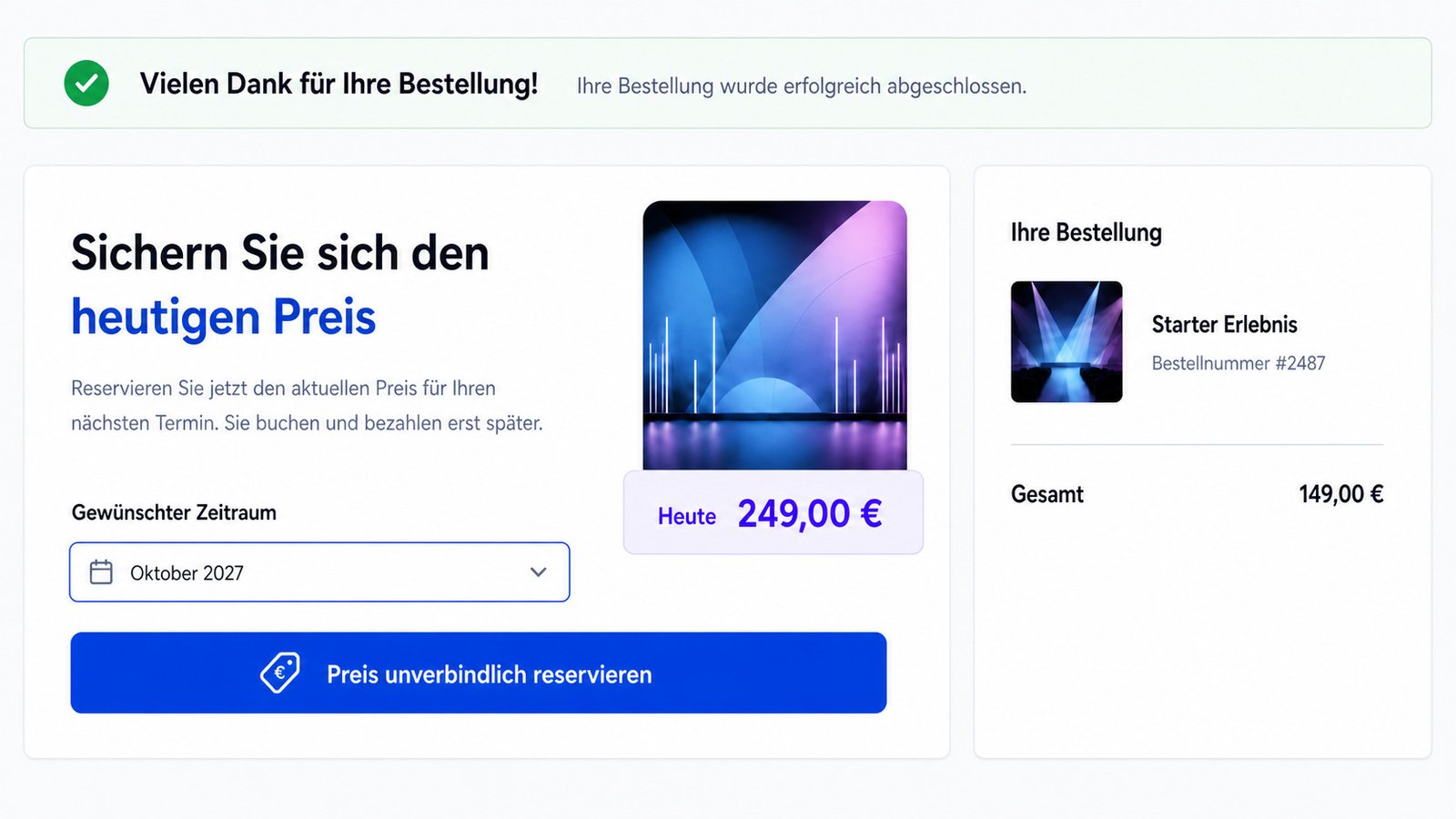
The question appears on the Thank You page:
Would you like to secure today’s price for our Big Event?
Eleven months later
The customer automatically receives an email:
Your reserved price is still valid. The Big Event starts next month.
After that
The customer returns and books the Big Event at the saved price.
In a short security analysis, we will show you specifically whether your WordPress site has been compromised, where risks exist, and how to prevent further damage.
A simple decision after purchase
Would you like to secure today’s price for our Big Event?
The customer does not buy anything extra yet. They simply reserve the current price for a later event booking.
Not a classic immediate upsell
Classic upsell
The customer buys another product directly after checkout.
Goal: Immediate additional sale
Price reservation
The customer secures today’s price for a later event.
Goal: Prepare a repeat booking
We review your WooCommerce checkout and implement the withdrawal button correctly from a technical standpoint – without interrupting ongoing operations.
More value from existing customer relationships
The WooCommerce post-purchase upsell links the first event booking with a suitable follow-up offer.
More repeat bookings
Customers get a clear reason to return for the next event.
Automated follow-ups
Reminders are sent at the scheduled time.
Stronger customer loyalty
The relationship remains active even between two events.
Additional follow-on business
Event customers you have already acquired are guided forward in a targeted way.
We review your WooCommerce checkout and implement the withdrawal button correctly from a technical standpoint – without interrupting ongoing operations.
How the solution works in the background
The WooCommerce post-purchase upsell links the completed purchase with the later event booking.
Event tiers
From the Starter Event to the Big Event
Courses
From the basic course to the advanced course
Annual events
From the current edition to the next edition
Event series
From one event to the next experience
How the solution works in the background
The WooCommerce post-purchase upsell links the completed purchase with the later event booking.
-
WooCommerce
Detects the purchase of the Starter Event and displays the appropriate follow-up offer. -
Price reservation
Stores the current price and the defined validity period. -
Email automation
Sends the reminder and brings the customer back to the Big Event.
Together we clarify which optimizations will make your WooCommerce store faster and more reliable.
Your price reservation for WooCommerce
Concept
We define the follow-up event, price, term, and customer journey.
Integration
We connect WooCommerce to your email system.
Testing
We review the entire journey through to the later booking.
Custom-built for your event offers, booking flows, and existing systems.
A simple decision after purchase
After checkout is completed, the price reservation appears directly on the WooCommerce Thank You page.
FAQs
Frequently asked questions about the WooCommerce post-purchase upsell
What is a WooCommerce post-purchase upsell?
A follow-up offer that is shown only after an order has been successfully completed.
When does the price reservation appear?
Directly after checkout, for example on the WooCommerce Thank You page.
Is the follow-up event purchased immediately?
No. The customer initially only secures the current price. The event booking takes place later.
Is the price reservation a discount?
No. What is stored is the regular price at the time of the first booking.
How is the customer reminded about the follow-up event?
An email automation sends the reminder at the scheduled time.
How long does the reserved price remain valid?
The term can be defined as a fixed period or based on the event date.
How is the customer recognized when they return?
Depending on the implementation, the assignment is made via the customer account, a personal link, or another unique identifier.
Can our existing email system be connected?
That depends on the available interfaces and will be checked before implementation.
Does the solution also work for multiple follow-up events?
Yes. Event series can also be mapped if the individual offers build on each other in a meaningful way.

